GitHub integration
The GitHub integration runs GitHub's official MCP server and gives the agent its tools for repositories, issues, pull requests and more.
Requirements
- Docker. A local setup starts GitHub's MCP server with
docker run ghcr.io/github/github-mcp-server, so Docker must be installed and running on your machine. - A GitHub personal access token. See Configuration.
Tools
| Tool Name | Description |
|---|---|
add_issue_comment |
Add a comment to a specific issue in a GitHub repository. |
add_pull_request_review_comment |
Add a review comment to a pull request. |
create_branch |
Create a new branch in a GitHub repository. |
create_issue |
Create a new issue in a GitHub repository. |
create_or_update_file |
Create or update a single file in a GitHub repository. If updating, you must provide the SHA of the file you want to update. |
create_pull_request |
Create a new pull request in a GitHub repository. |
create_pull_request_review |
Create a review for a pull request. |
create_repository |
Create a new GitHub repository in your account. |
delete_file |
Delete a file from a GitHub repository. |
fork_repository |
Fork a GitHub repository to your account or specified organization. |
get_code_scanning_alert |
Get details of a specific code scanning alert in a GitHub repository. |
get_commit |
Get details for a commit from a GitHub repository. |
get_file_contents |
Get the contents of a file or directory from a GitHub repository. |
get_issue |
Get details of a specific issue in a GitHub repository. |
get_issue_comments |
Get comments for a specific issue in a GitHub repository. |
get_me |
Get details of the authenticated GitHub user. |
get_pull_request |
Get details of a specific pull request in a GitHub repository. |
get_pull_request_comments |
Get comments for a specific pull request. |
get_pull_request_files |
Get the files changed in a specific pull request. |
get_pull_request_reviews |
Get reviews for a specific pull request. |
get_pull_request_status |
Get the status of a specific pull request. |
get_secret_scanning_alert |
Get details of a specific secret scanning alert in a GitHub repository. |
get_tag |
Get details about a specific git tag in a GitHub repository. |
list_branches |
List branches in a GitHub repository. |
list_code_scanning_alerts |
List code scanning alerts in a GitHub repository. |
list_commits |
Get list of commits of a branch in a GitHub repository. |
list_issues |
List issues in a GitHub repository. |
list_pull_requests |
List pull requests in a GitHub repository. |
list_secret_scanning_alerts |
List secret scanning alerts in a GitHub repository. |
list_tags |
List git tags in a GitHub repository. |
merge_pull_request |
Merge a pull request in a GitHub repository. |
push_files |
Push multiple files to a GitHub repository in a single commit. |
request_copilot_review |
Request a GitHub Copilot code review for a pull request. Use this for automated feedback on pull requests, usually before requesting a human reviewer. |
search_code |
Search for code across GitHub repositories. |
search_issues |
Search for issues in GitHub repositories. |
search_repositories |
Search for GitHub repositories. |
search_users |
Search for GitHub users. |
update_issue |
Update an existing issue in a GitHub repository. |
update_pull_request |
Update an existing pull request in a GitHub repository. |
update_pull_request_branch |
Update the branch of a pull request with the latest changes from the base branch. |
Configuration
Our Github integration supports Personal Access Token based authentication. Below are instructions for setting up the two most common PAT token types:
- Create a Classic PAT
- Create a Fine Grained PAT (Recommended)
Create a Classic PAT
- Go to GitHub Settings:
- Click your profile picture in the top right
- Select "Settings"
- Click "Developer settings" at the bottom of the left sidebar
-
Click "Personal access tokens" → "Tokens (classic)"
-
Generate a new token:
- Click "Generate new token" → "Generate new token (classic)"
- Give your token a descriptive name in the "Note" field
-
Set an expiration date (recommended for security)
-
Select the required scopes:
- For basic repository access:
reposcope - For private repositories: ensure
repois selected -
For public repositories only:
public_reposcope -
Click "Generate token" and copy the token immediately (you won't be able to see it again)

Create a Fine Grained PAT (Recommended)
- Go to GitHub Settings:
- Click your profile picture in the top right
- Select "Settings"
- Click "Developer settings" at the bottom of the left sidebar
-
Click "Personal access tokens" → "Fine grained tokens"
-
Generate a new token:
- Click "Generate new token" → "Generate new token"
- Give your token a name, for example
altimate-workspaces - Set an expiration date (recommended for security)
- Select the repositories
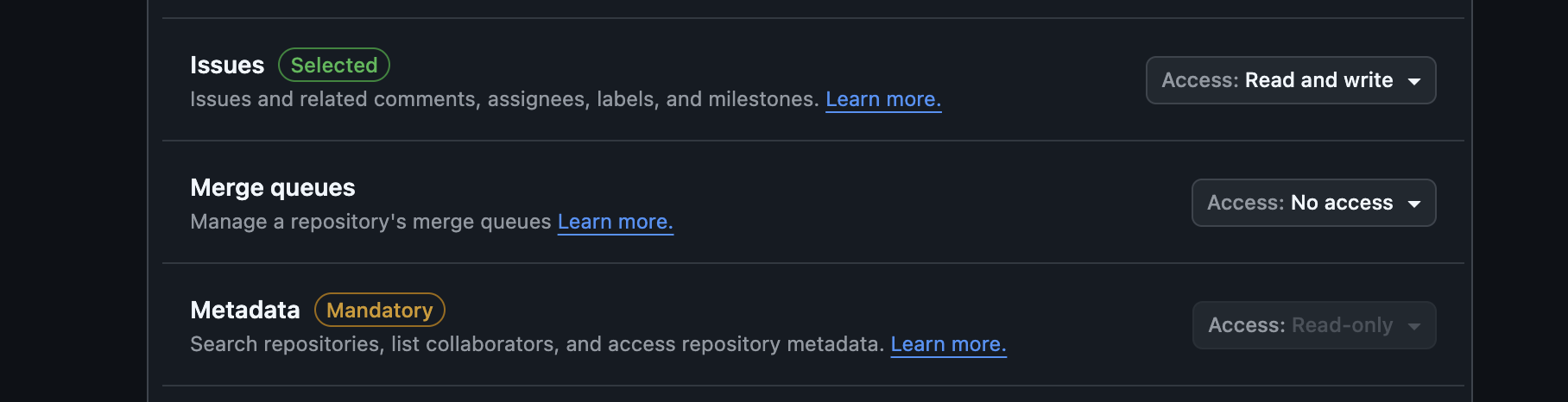
- Select the following permissions -
Issues - read and write
Metadata permissions are automatically granted read access by enabling any other permission
Organization owners can restrict the access of personal access token (classic) to their organization. If you try to use a personal access token which has been access controled at your account level, your request will fail with a 4xx response.